Bounds vs. Speechify
Speechify reads your text aloud with an AI voice and highlights each word as it’s spoken. Bounds doesn’t make a sound: it scrolls your text past a fixed reading line, and you read it yourself. One is listening, the other is reading, and both keep you moving at a pace you set. Here is what each does, where they overlap, where Speechify wins and what the research says about reading and listening.
By Bug City, the makers of Bounds. Speechify checked on its own site and app store listings on .
Speechify
- How it works
- Text to speech: an AI voice reads your text aloud while the app highlights each word as it’s spoken, “synced, word for word”, so you can follow along. You choose the voice and the speed.
- Where it runs
- Apps for iPhone and iPad, Android, Mac and Windows, a web app, and Chrome and Edge extensions.
- What it opens
- PDF, EPUB, DOCX, XLSX and TXT files, web links, typed or pasted text, and photos or screenshots of printed pages, which it reads with text recognition (OCR).
- Top speed
- Its Google Play listing says you can “hear anything up to 4.5× faster (900 wpm)”; its pricing page limits the free plan to 1.5×.
- Also
- More than 1,000 voices in over 60 languages, AI summaries and chat about what you’re reading, voice typing (dictation), AI podcasts made from a document, a library synced across devices, and offline listening with Premium.
- Price
- A free plan with “10 robotic sounding voices”, speeds up to 1.5× and text to speech only. Premium is $29 a month, or $139 billed yearly, on its pricing page; in the App Store, Premium is listed at $139.99 among its in-app purchases.
- What it says
- “Speechify lets them read faster, read more, and remember more.” (its founder, on its home page)
“Reading & listening helps you retain more.” (its App Store listing) - Who makes it
- Speechify Inc. Its founder, Cliff Weitzman, writes on its home page that he is dyslexic and built Speechify as his own text-to-speech tool.
Sources, read 25 November 2026: speechify.com, speechify.com/pricing, App Store listing, Google Play listing.
Where they overlap
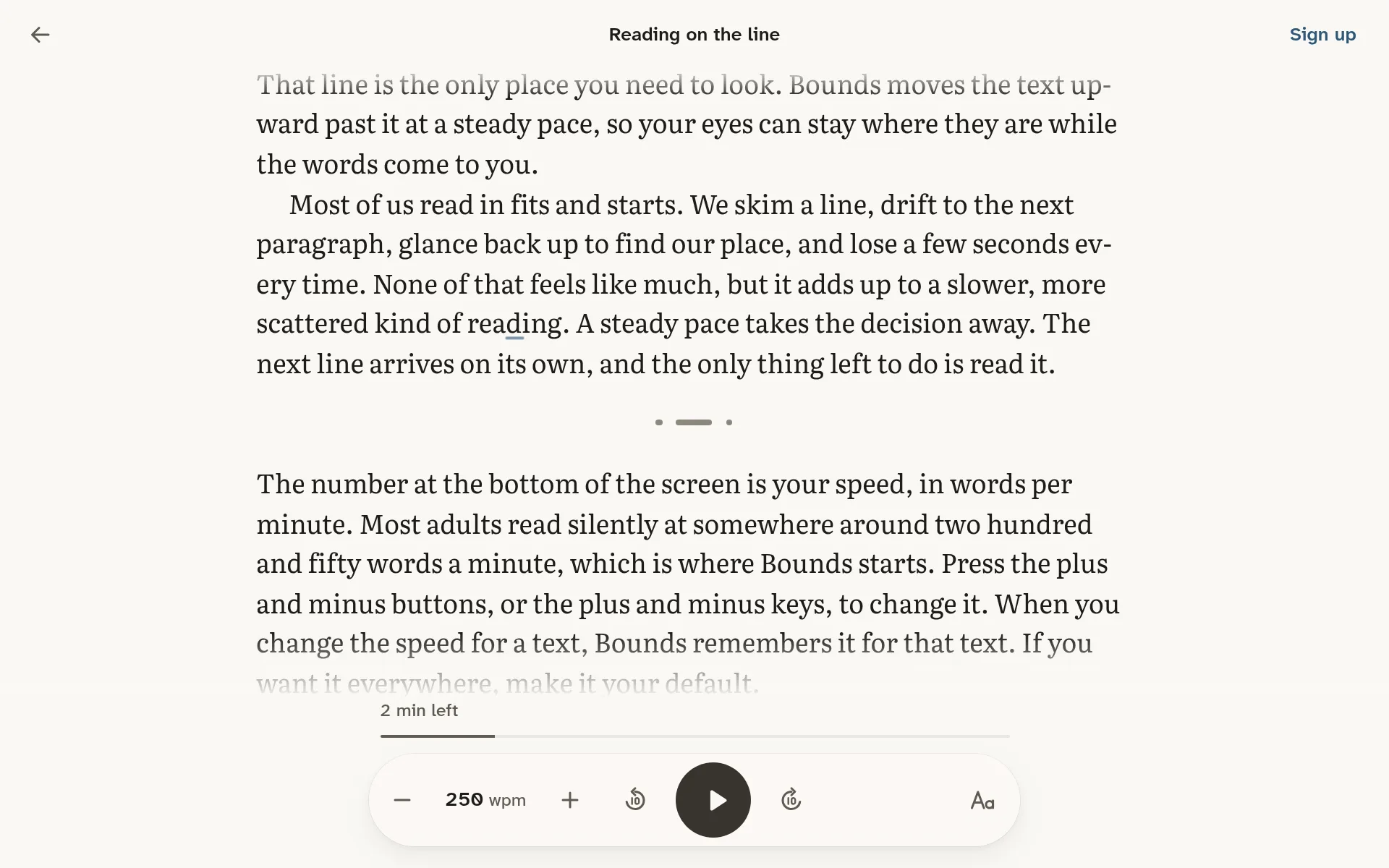
Both move through your text at a pace you set, so you don’t have to push yourself along it: Speechify’s voice reads it aloud and highlights each word as it goes, and Bounds scrolls the lines past a fixed reading line and marks the line to read. Both run in the browser and on phones, take pasted text, web articles and EPUB books, and keep your place (Bounds with an account).
How Bounds is different
- You read the text yourself, silently. Bounds has no voice and plays no sound; it moves the words, and your eyes do the reading.
- The pace is in words a minute, from 100 to 1,000, and you can change it while you read. Pause with a tap or the space bar, and Bounds backs up a line when you start again; rewind steps back about ten seconds of reading to the start of a sentence.
- Bounds is free to use, with nothing to install, and anyone can try it on the front page without an account.
Where Speechify wins
Speechify reads to you, so you can take in a text with your eyes closed or busy: walking, driving, cooking, or when reading on a screen is hard. Bounds can’t do that. Speechify also has native apps on four platforms and two browser extensions, opens PDFs, Word files and photos of printed pages, has more than 1,000 voices in over 60 languages, and works offline with Premium. If you want to listen, or a screen of text is a barrier for you, Speechify is the better fit.
Bounds has no App Store or Google Play app yet; it is a web app you can add to your home screen.
What the research says about reading and listening
Two meta-analyses by the same researcher pulled together the studies that compare the two:
- Listening Ears or Reading Eyes: A Meta-Analysis of Reading and Listening Comprehension Comparisons (Virginia Clinton-Lisell, Review of Educational Research, 2022). Across 46 studies with 4,687 people of all ages, understanding was about the same whether people read a text or listened to it. Reading came out ahead when readers set their own pace, and on questions that needed inferences or the overall meaning rather than literal details. The abstract ends: “both audio and written options are needed for accessible instruction”. (From the abstract; the full text is paywalled.)
- Does Reading while Listening to Text Improve Comprehension Compared to Reading Only? A Systematic Review and Meta-Analysis (Virginia Clinton-Lisell, Educational Research: Theory and Practice, 2023). Across 30 studies with 1,945 readers without learning disabilities, listening while reading gave a trivial overall benefit over reading alone, and the benefit appeared only in studies where the experimenter set the reading pace. When people read at their own pace, adding the audio made no reliable difference. A human voice did no better than a computer voice. The author says struggling readers may benefit but there are too few studies to say, and that students who want audio-assisted reading “should not be discouraged”.
Neither found that listening beats reading, or that listening while you read beats reading alone, for people who can read comfortably at their own pace. And the 2022 review ends by saying that “both audio and written options are needed”. Bounds makes no claim about comprehension: it sets a steady pace, and set faster than you can follow, you understand less. Does speed reading work? goes through what a 2016 review of the research found about reading faster.
For other ways to pace your reading, see Bounds vs. Spritz, Outread and Reedy, apps that flash one word at a time, and Bounds vs. Bionic Reading, which bolds the start of each word. Teleprompters scroll text too, for reading aloud: see Bounds vs. teleprompter apps.
Try Bounds without an account
Anyone can try Bounds on the front page without an account: paste text and it opens in the reader. Accounts, which keep a library and your place, are invite-only for now. Bounds is free to use.
How Bounds works shows the reader and its three focus guides. The reading speed test measures your normal speed, a good place to start.